Best Monitor Arms for Small & Shallow Desks 2026
If your desk is barely deep enough for a keyboard, a base-stand monitor is stealing space you can’t spare. A monitor arm clamps to the edge, lifts the screen off the surface, and hands you back the depth where your stand’s foot used to sit. But on a small or shallow desk, not every arm fits. The clamp footprint can eat into your keyboard zone, and a long arm can swing the screen off the back edge into the wall.
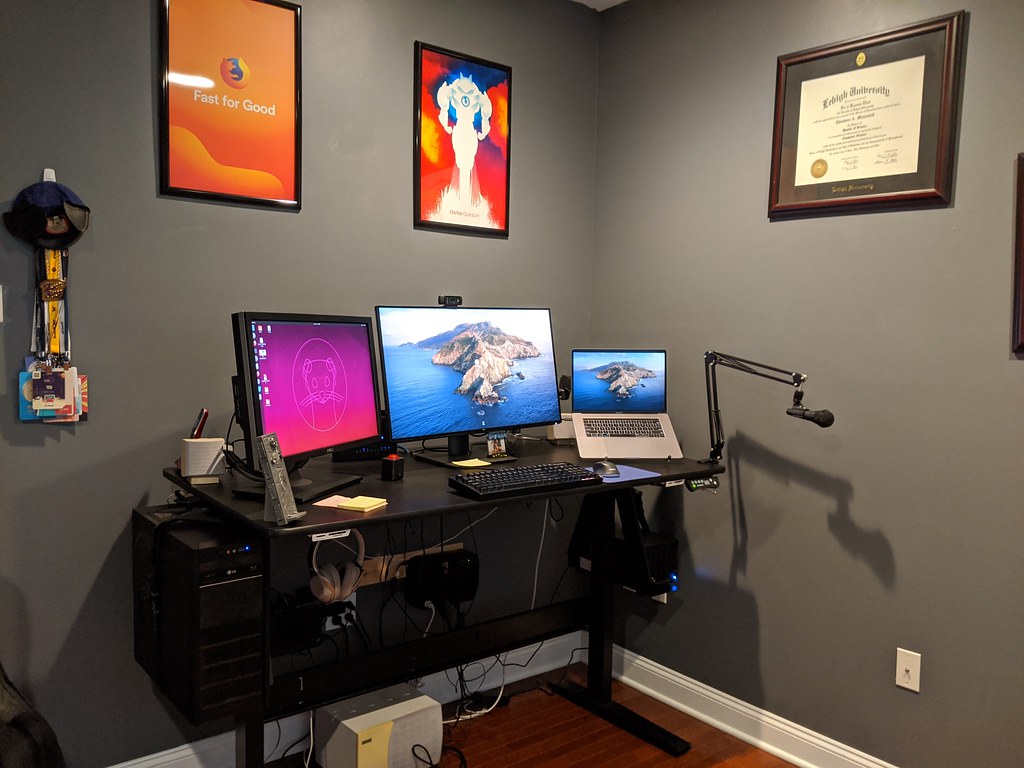
This guide focuses on arms that suit shallow desks specifically: how much desk depth they reclaim, how big the clamp footprint is, and how their reach behaves when there’s no room behind the desk. We cover single and dual options, plus the gas-spring vs. mechanical-spring trade-off that matters most when space is tight.
Disclosure: TinyOfficeLab is reader-supported. As an Amazon Associate, we earn from qualifying purchases at no extra cost to you. We research specs from manufacturer and retailer listings plus owner feedback; we don’t perform first-hand lab testing.
For renters worried about clamp damage or screw holes, pair this with our Best No-Drill Monitor Arms & Desk-Clamp Mounts for Renters. And if you’re still deciding whether you need an arm at all, see Monitor Arm vs Monitor Stand vs Riser.
How We Chose for Small & Shallow Desks
A monitor arm marketed for a big standing desk can be the wrong tool for a 20-inch-deep apartment desk. Here’s what we weighed.
Reclaimed desk depth
The whole point. A typical 24–27 inch monitor stand has a foot that reaches 7–9 inches back. An arm replaces that with a clamp at the very back edge, freeing the entire depth in front of the screen. On a shallow desk, that’s often the difference between cramped and usable.
Clamp footprint
The clamp is the one part still on your desktop, and it varies a lot. A compact C-clamp occupies a small patch at the back edge; a wide base plate can intrude several inches forward into your working area. On a small desk, smaller is better. We also note grommet options, which clamp through a hole and take up almost no surface area at all.
Reach behavior on shallow desks
This is the trap. A long arm extends the screen forward, which is great, but to push the monitor back it needs room behind the desk. On a shallow desk pushed against a wall, an arm that wants to fold rearward may hit the wall before the screen sits where you want it. Shorter-reach arms and ones that retract compactly over their own base tend to behave better in tight spots.
Gas spring vs. mechanical spring
- Gas spring uses compressed nitrogen. You set the height once and it floats there; reposition with a light touch. Best if you adjust often (sit/stand, sharing the desk) and your monitor is in the supported weight band.
- Mechanical spring uses a metal coil. Often cheaper and very stable once set, but stiffer to reposition and fussier with very light monitors. Fine if you’ll set the height and leave it.
VESA, weight, and screen-size support
Every pick below supports the two universal patterns, VESA 75x75mm and 100x100mm. The number that trips people up is weight: gas-spring arms have a minimum as well as a maximum. Mount a 4 lb monitor on an arm rated 8.8–19.8 lbs and the spring will fight you, drifting upward. Always match your monitor’s actual weight (VESA bracket attached) to the range.
Quick Comparison
| Arm | Single/Dual | Mechanism | Screen size | Weight support | VESA | Best for |
|---|---|---|---|---|---|---|
| Amazon Basics Gas Spring Single | Single | Gas spring | 15–27 in | 4.4–15.4 lbs | 75/100 | Budget single, light monitors |
| HUANUO Single Gas Spring | Single | Gas spring | 13–32 in | 4.4–19.8 lbs | 75/100 | Wider size/weight range |
| Ergotron LX Single | Single | Gas (Constant Force) | up to 34 in | 7–25 lbs | 75/100 | Heavy/ultrawide, premium |
| Amazon Basics Gas Spring Dual | Dual | Gas spring | 15–27 in | 4.4–15.4 lbs each | 75/100 | Two light screens, value |
| VIVO STAND-V002 Dual | Dual | Mechanical spring | up to 30 in | up to 22 lbs each | 75/100 | Dual on one small clamp |
The Picks
Best Budget Single: Amazon Basics Gas Spring Single Monitor Arm
If you want gas-spring float without a premium price, this is the easy starting point. It fits 15–27 inch monitors, supports 4.4–15.4 lbs, and uses both VESA 75×75 and 100×100 patterns. Crucially for shallow desks, it mounts with either a C-clamp or a grommet on desks roughly 0.39–4 inches thick, so you can choose the lower-footprint grommet route if your desk has (or you can drill) a pass-through hole.
It offers full tilt, ±90° swivel, and 360° rotation, with extension up to about 20.5 inches of reach. That long reach is a plus when you want to pull the screen toward you, but on a shallow desk against a wall, you likely won’t use most of it, and that’s fine.
Watch the weight floor. At 4.4 lbs minimum, very light 22-inch panels can sit near the bottom of the range; owners note gas-spring arms feel “too strong” with light screens until you back off the tension screw. Best for typical 24–27 inch monitors in the 6–12 lb range.
Best All-Around Single: HUANUO Single Monitor Gas Spring Arm
HUANUO’s single gas-spring arm covers a broader band than the Amazon Basics: 13–32 inch screens and 4.4–19.8 lbs, with VESA 75/100. That extra headroom matters if you have a heavier 27–32 inch panel that the Amazon Basics arm can’t handle.
For shallow desks, the appeal is the compact single-pole design and small C-clamp, which HUANUO says saves more than 80% of the desktop space a base-foot stand uses, the same reclaimed-depth benefit you’re after. It mounts via C-clamp or grommet, with the clamp accommodating common desk-edge thicknesses, and installs as a one-piece assembly in a few minutes.
Owners consistently praise the value and the smooth gas spring once tension is dialed in. As with any gas-spring arm, set the spring tension to your monitor’s weight before you mount the screen, then fine-tune.
Best Premium Single (Heavy / Ultrawide): Ergotron LX
When the monitor is heavy or ultrawide, a cheap arm sags. The Ergotron LX is the long-standing benchmark: it supports 7–25 lbs on screens up to 34 inches, with VESA 75/100, and uses Ergotron’s Constant Force lift that holds position smoothly across a 13-inch vertical range.
For small-desk users the key detail is the LX’s low-profile clamp option and its ability to retract compactly over its own base, so it doesn’t have to swing far behind the desk to sit back. The standard clamp fits desk edges roughly 0.4–2.4 inches thick; the included grommet hardware fits surfaces up to about 3 inches via a pass-through hole, giving you a near-zero surface footprint.
Note the 7 lb minimum: this arm is built for substantial monitors. A light 22-inch panel will float up and won’t stay down. It’s also the priciest pick here, but it’s the one most likely to outlive several monitors.
Best Value Dual: Amazon Basics Gas Spring Dual Monitor Arm
Two arms, one clamp. This dual mount fits two 15–27 inch monitors, supports 4.4–15.4 lbs per arm, and uses VESA 75/100 with adjustable gas-spring tension on each side. Both arms ride a single clamp at the back edge, so you keep the clamp footprint of one mount while running two screens, exactly what a small desk needs.
It’s the natural step up from the Amazon Basics single if you’ve decided to go dual on a budget. The same caveats apply: it’s tuned for light-to-medium monitors, so confirm each screen lands inside the 4.4–15.4 lb window, and budget a few minutes per arm to balance the springs.
On a genuinely shallow desk, two side-by-side 27-inch screens may be too wide regardless of the arm. If width is your constraint, consider angling the screens inward (the swivel makes this easy) or stepping down to two 24-inch panels.
Best Dual on the Smallest Clamp: VIVO STAND-V002
The VIVO STAND-V002 is the classic single-pole dual mount: both arms attach to one center pole that clamps at the desk edge, so the surface footprint stays tiny even as the arms extend independently. It handles screens up to 30 inches and up to 22 lbs per arm, with VESA 75/100, and includes both C-clamp and grommet bases.
This is a mechanical-spring mount rather than gas-spring (VIVO sells gas-spring counterbalance variants separately). The trade-off: it’s stable and inexpensive, and once you set monitor height it stays put, but repositioning is stiffer and the height adjusts along the pole rather than floating freely. For a fixed dual setup on a small desk, that’s often exactly what you want, set it and forget it.
Because it’s pole-based, the screens sit relatively close to the clamp line, which keeps them from swinging into a wall behind a shallow desk. It’s a strong “I just want two screens off my desk surface without spending much” choice.
How to Fit an Arm to a Shallow Desk: Quick Checklist
- Measure your desk depth and edge thickness. Most clamps want roughly 0.4–2.4 inches of edge thickness; thicker tabletops may need a specific clamp or the grommet option.
- Weigh your monitor with the VESA bracket on. Match it to the arm’s full range, minimum and maximum.
- Check the wall gap. If the desk is flush to a wall, favor pole-based or compact-retract arms (VIVO, Ergotron LX) over long-reach arms that need rear clearance.
- Prefer grommet mounting if you can, the lowest possible surface footprint.
- Route the cables down the arm. Most of these include cable clips; tidy cabling is what makes the reclaimed depth actually usable.
Frequently Asked Questions
Does a monitor arm really save space on a small desk?
Yes, primarily by removing the stand’s foot. A base stand reaches 7–9 inches back into your desk; an arm relocates all of that to a clamp at the rear edge, freeing the depth in front of the screen for your keyboard and hands. The only surface still occupied is the clamp itself.
How much desk depth do I need behind the monitor?
Less than you’d think for the clamp, but more than you’d think for reach. The clamp needs only the back inch or two. Pushing the screen backward, though, requires the arm to fold rearward, which needs clearance behind the desk. If your desk is against a wall, choose a pole-based dual (VIVO) or an arm that retracts compactly over its base (Ergotron LX).
Gas spring or mechanical spring for a small desk?
If you reposition often or share the desk, gas spring is worth it for the effortless float. If you’ll set the height once and leave it, a mechanical-spring mount like the VIVO is cheaper and rock-steady. Neither saves more desk depth than the other, that’s about the clamp and reach, not the spring.
Will these arms damage my desk or my rental’s furniture?
The clamp’s grip plates can mark soft surfaces. Slip a thin felt or rubber pad between the clamp and the desk to protect the finish. For renters specifically, see our Best No-Drill Monitor Arms & Desk-Clamp Mounts for Renters for clamp-only options that leave no holes.
My monitor drifts up or won’t stay down. What’s wrong?
Two usual causes. Either the monitor is lighter than the arm’s minimum rating (common with budget gas-spring arms and small panels), or the tension screw isn’t dialed to your screen’s weight. Adjust the tension first; if the screen is well below the arm’s minimum, you need an arm rated for lighter loads.
Can I run two monitors on a shallow desk?
Yes, with a single-clamp dual mount, but watch width, not just depth. Two 27-inch screens side by side are wide; on a small desk, angle them inward using the swivel joints, or drop to two 24-inch panels. The clamp footprint stays small either way.
Bottom Line
For a small or shallow desk, the arm that wins is the one with the smallest clamp footprint and reach behavior that won’t fight a wall behind you. For a single light monitor on a budget, the Amazon Basics Gas Spring Single or the wider-range HUANUO are easy wins. For a heavy or ultrawide screen, the Ergotron LX is the durable benchmark. Going dual, the Amazon Basics Gas Spring Dual is the value pick, while the VIVO STAND-V002 keeps two screens on one tiny, stable clamp. Measure your edge thickness and monitor weight first, and you’ll reclaim depth you didn’t know your desk had.
Prices and availability change; confirm current details on the product page before buying.