Best No-Drill Monitor Arms for Renters (2026)
TinyOfficeLab is reader-supported. We may earn a commission from links on this page, at no cost to you. As an Amazon Associate we earn from qualifying purchases.
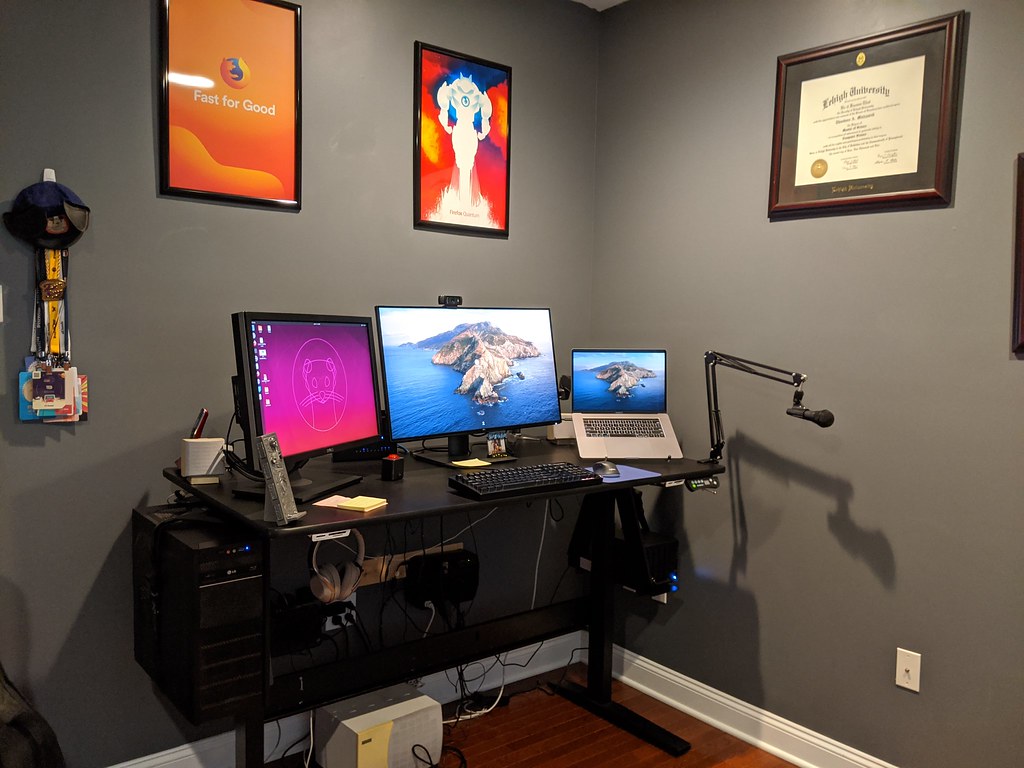
If you rent, the cleanest way to free up desk space and fix your neck angle is a monitor arm that mounts to the desk itself — no holes in the wall, no holes in the desk, and nothing to spackle over when you move out.
That’s the whole problem this guide solves: how to get a real ergonomic setup that fits a tiny apartment and keeps your security deposit intact.
We’ll walk through the three mount styles renters actually have to choose between, exactly how to measure your desk so a clamp doesn’t show up and not fit, and a simple checklist to confirm it’ll work before you buy.
The Renter’s Core Problem (and Why a Monitor Arm Fixes It)
A monitor sitting on its factory stand does two things you don’t want in a small space:
- It eats your desk depth. The base plus the stand can claim several inches of the most usable part of your desk.
- It locks your screen too low. Most stock stands put the top of the screen below eye level, which pulls your head and neck forward.
Standard ergonomic guidance is simple: the top of your screen should sit at or just below eye level, the screen roughly an arm’s length away, and your elbows around 90 degrees. A stock stand rarely gets you there.
A monitor arm lifts the screen off the desk, frees the space underneath, and lets you dial in height, tilt, and distance. For renters specifically, the appeal is that the good ones attach to the desk — not the wall — so there’s no drilling and nothing to repair later.
Small-Space Desk Setup: How to Fit a Real Workspace in a Tiny Apartment
Three Mount Types Renters Can Choose From
There isn’t one “no-drill” mount. There are three, and the right one depends on your desk and your wall situation.
1. Clamp Mounts (the default pick for most renters)
A clamp (or “C-clamp”) mount grips the edge of your desk with a vice-style bracket — one plate on top, one underneath, tightened together. No tools beyond the included hardware, no holes.
Best for: renters with a sturdy desk that has an open, accessible back edge.
Watch out for: desks with a back lip, a wall-hugging back panel, or a fragile/hollow top.
This is the style most of this guide focuses on, because it’s the one most renters end up buying.
2. Grommet Mounts (skip these unless your desk already has the hole)
A grommet mount bolts through an existing hole in the desktop (the round cable cutout some desks ship with). It’s rock-solid, but it requires that hole — and drilling one into a desk you don’t own (or a rental-provided desk) defeats the point.
Best for: desks that already have a grommet hole you’re willing to use.
For most renters: not the move. Mentioning it only so you know what the second clamp/grommet option in the box is for.
3. Freestanding / Pole & Adhesive Mounts (the no-edge fallbacks)
If a clamp won’t work for your desk, you have two fallbacks:
- Freestanding / weighted-base or pole mounts sit on the desktop with a heavy base instead of clamping. They use desk surface rather than the edge, so they work on desks with awkward edges — but they reclaim less floor-of-desk space than a clamp.
- Adhesive / tension-based mounts are rarer and lighter-duty. Treat heavy-duty adhesive with caution on rental furniture and finished surfaces; it can lift veneer or finish when removed.
Best for: desks where the back edge is blocked or too thick/thin to clamp.
If you already know which style you need, jump to our picks below.
How to Measure Your Desk-Edge Thickness (Do This First)
This is the single step that prevents a returned package. A clamp mount only opens so far, and most consumer clamps fit desk edges up to about 2.4 in (60 mm) thick. Some fit thicker; many fit thinner. Always check the spec against your actual desk.
Here’s how to measure correctly:
- Measure the edge thickness. At the spot where the clamp will sit (usually the back edge), measure the full top-to-bottom thickness of the desktop with a tape measure or calipers. Include any trim or lip the clamp would have to span.
- Check clearance behind and under the edge. The bottom clamp plate needs room to swing under the desk. A back panel, drawer rail, frame bar, or apron can block it. Measure how much open underside you have for at least a few inches in from the edge.
- Note the surface material. Solid wood and quality MDF clamp well. Glass, thin veneer over hollow cores, and particleboard need a desk pad/spacer and a check on the weight rating.
- Confirm an open mounting spot. You need a stretch of clear edge wide enough for the clamp footprint, away from legs and corners.
A quick way to picture it: lay a tape measure flat against the back edge of the desk to read the full top-to-bottom thickness, then look underneath to confirm the bottom clamp plate has a few inches of open space to grip — no apron, rail, or back panel in the way.
If your edge is thicker than the clamp’s max, or the underside is blocked, that’s your signal to look at a freestanding/pole mount instead.
Single vs. Dual Arm: What Small & Shallow Desks Should Pick
In a tiny apartment, desk depth and clamp load matter more than they do for someone with a big setup.
Go single-arm if:
- You run one monitor (or a laptop + one monitor).
- Your desk is shallow (front-to-back), so the screen needs to push back and tuck close to free up typing room.
- You want the smallest clamp footprint and the lowest load on a lightweight desk.
A single arm is the safer, simpler choice for most small-space renters.
Consider dual-arm if:
- You genuinely use two monitors daily.
- Your desk is wide enough to spread two screens at a comfortable distance, and the back edge is sturdy.
Two screens on one clamp puts more leverage and weight on a single edge point. On a light or hollow-core rental desk, that’s a real concern — confirm the weight rating and the desk’s sturdiness before committing.
A note on shallow desks: a tall screen close to your face is uncomfortable. If your desk is very shallow, prioritize an arm with good reach/extension so you can push the monitor back to roughly arm’s length, and pick a monitor size that fits that distance.
What to Look For (The Spec Shortlist)
When you compare arms, these are the specs that actually decide fit and comfort:
- VESA compatibility. Your monitor needs VESA mounting holes (commonly 75×75 mm or 100×100 mm). Check your monitor’s spec, and confirm the arm covers that pattern. Some thin or all-in-one monitors aren’t VESA-ready and need a separate adapter plate.
- Weight rating (and range). Match it to your monitor’s weight, including any VESA adapter. Good arms list a range — too-light a monitor on a stiff arm won’t hold position; too-heavy will droop.
- Reach / extension. How far the arm pulls the screen out and pushes it back. This is what lets shallow-desk users hit arm’s-length distance.
- Height range & tilt/swivel/rotate. You want enough height travel to get the screen top to eye level, plus tilt for glare and rotate if you ever want portrait orientation.
- Mounting options included. Many arms ship with both a clamp and a grommet base. Renters will use the clamp.
- Cable management. Channels or clips along the arm keep the freed desk space looking clean.
- Build & motion type. Gas-spring arms adjust smoothly with one hand; mechanical-spring and static arms are cheaper but fiddlier to reposition.
Our Picks: Real No-Drill Mounts for Renters
A quick note on how we choose: these recommendations are based on each product’s published manufacturer/retailer specifications plus the patterns we see in verified owner and reviewer feedback. We haven’t physically tested every unit ourselves, so we focus on the specs that decide fit (clamp range, VESA, weight, reach) and on what owners consistently report. Prices shift constantly, so we describe each pick by tier (budget / mid / premium) rather than quoting a dollar figure that will be wrong by next week.
Best Overall Single Arm — Ergotron LX (Single Monitor)
Best for: renters who want a buy-it-once arm that adjusts effortlessly and holds position for years.
The Ergotron LX has been a benchmark single-monitor arm for well over a decade, and owners consistently praise how smoothly its patented gas-spring (CF) motion glides and stays put with one-hand adjustment. It fits flat, curved, and ultrawide monitors up to 34 inches and 7–25 lbs, covers VESA 75×75 and 100×100 mm, and includes both a two-piece desk clamp (fits desk edges 0.4–2.4 in) and a grommet mount (for desks up to 2.25 in). It offers up to ~13 in of lift / ~17.3 in of height range, 75° tilt, and 360° rotation, plus a long reach that’s ideal for pushing a screen back to arm’s length on a shallow desk. This is a premium-tier pick, and the long warranty Ergotron is known for is a big part of why owners consider it worth the step up.
Check the Ergotron LX on Amazon
Best Budget Single Arm — HUANUO Single Monitor Mount (Gas Spring)
Best for: renters who want smooth gas-spring motion without the premium price.
This HUANUO single arm is a popular budget-to-mid pick, and owners frequently call out how easy the clamp is to set up. It fits 13–32 in monitors and 4.4–19.8 lbs, supports VESA 75×75 and 100×100 mm, and ships with both a C-clamp (fits desks roughly 0.39–2.56 in thick) and a grommet base (for desks ~0.39–2.17 in). The automotive-grade gas spring gives one-hand height adjustment plus tilt, swivel, and 360° rotation. A great value choice for a single screen on a standard rental desk.
Check the HUANUO Single Mount on Amazon
Best Dual-Monitor Arm — HUANUO Dual Monitor Mount (Gas Spring)
Best for: two-screen users with a wider, sturdy desk.
For renters who truly run two monitors, this HUANUO dual gas-spring mount puts both screens on one clamp with independent height, tilt, and swivel per arm. It fits two 17–32 in monitors, with each arm holding up to ~22 lbs, supports VESA 75×75 and 100×100 mm, and offers a wider C-clamp range (about 0.39–3.15 in) plus a grommet base (~0.39–2.17 in) — handy if your desk edge is on the thicker side. Owners report the gas springs hold position well once tensioned. Remember that two screens load a single edge point harder, so confirm your desk is sturdy first.
Check the HUANUO Dual Mount on Amazon
Best Premium Dual — Ergotron LX Dual
Best for: dual-screen renters who want the same buy-it-once quality as the single LX.
If you want the dual setup but the LX-level smoothness and longevity, the Ergotron LX Dual mounts two monitors up to 27 in each at 7–20 lbs per arm, with VESA 75×75 and 100×100 mm support and Ergotron’s signature one-hand CF motion. It’s a premium-tier option that owners tend to keep across multiple moves and desks.
Check the Ergotron LX Dual on Amazon
Best Freestanding / No-Clamp — VIVO Single Monitor Desk Stand (STAND-V001H)
Best for: desks where a clamp won’t work — blocked back edge, glass top you don’t want to clamp, or a built-in/landlord-provided desk you’d rather not grip.
When clamping isn’t an option, this VIVO freestanding stand uses a heavy steel base that simply sits on the desktop — no edge clamping, no drilling. It holds screens up to 32 in (and up to 38 in ultrawide) and up to ~22 lbs, supports VESA 75×75 and 100×100 mm, and offers height adjustment, tilt, swivel, and 360° rotation. The anti-slip base protects the desk surface. It reclaims less under-desk space than a clamp arm, but it’s the most flexible option for awkward or fragile desks. Budget-to-mid tier.
Check the VIVO Freestanding Stand on Amazon
Best for Thick (or Thin) Desk Edges — Amazon Basics Gas Spring Single Monitor Arm
Best for: renters whose desk edge falls outside a typical clamp’s range — especially thicker edges.
The standout spec here is clamp reach: this Amazon Basics gas-spring arm’s C-clamp and grommet mounts cover desks roughly 0.39–4 in thick, which is wider than most consumer clamps and a genuine fix if your desk edge is too thick for a standard arm. It fits 15–27 in monitors and 4.4–15.4 lbs, supports VESA 75×75 and 100×100 mm, and provides gas-spring height adjustment with tilt, swivel, and rotation, plus extension around 20 in for shallow-desk reach. A budget-tier pick with a clamp range that solves the “too thick to clamp” problem.
Check the Amazon Basics Gas Spring Arm on Amazon
Brands you’ll see throughout this category include Ergotron, Amazon Basics, HUANUO, and VIVO. Always double-check the current listing specs against your own desk measurements before buying — clamp ranges and weight ratings vary by exact model.
The “Will It Fit Your Desk?” Checklist
Run through this before you buy. If you can check all of these, a clamp mount will almost certainly work:
- [ ] Edge thickness is within the arm’s clamp range (most fit up to ~2.4 in / 60 mm).
- [ ] Underside clearance at the edge is open — no back panel, frame bar, or drawer in the way.
- [ ] Open edge width is enough for the clamp footprint, away from legs/corners.
- [ ] Desk is sturdy and the top isn’t thin glass or fragile hollow-core (or you have a pad/spacer and the weight is well within rating).
- [ ] Monitor is VESA-compatible (or you’ve got the right adapter).
- [ ] Monitor weight sits inside the arm’s rated range.
- [ ] Reach is enough to set the screen at about arm’s length on your desk depth.
Any box you can’t check points you toward a freestanding/pole mount instead of a clamp.
Deposit-Safe Apartment Upgrades That Leave No Trace
Deposit-Safe Setup Tips
The point of all this is to leave no evidence. A few habits that keep it clean:
- Use a desk pad or the included spacers under the clamp plates. They spread the load and prevent dents or finish marks on the desktop.
- Don’t overtighten. Snug and stable is the goal; cranking the clamp can crush a soft top or crack a finish.
- Keep it on the desk, not the wall. Clamp and freestanding mounts mean zero wall holes — the whole reason they beat wall mounts for renters.
- Be cautious with heavy-duty adhesive on rental furniture and painted/finished surfaces; it can pull finish or veneer when removed.
- Keep the box and hardware. Re-stand the monitor on its factory base when you move, and the desk goes back exactly as you found it.
FAQ
Will a monitor arm damage my desk?
A properly fitted clamp mount shouldn’t, especially with a pad or spacer under the plates. The risks are over-tightening on a soft or thin top, or clamping a fragile material like thin glass. Match the arm to your desk’s material and weight rating, and don’t crank it.
What if my desk edge is too thick for the clamp?
If your edge is thicker than the clamp’s max (commonly ~2.4 in / 60 mm), the clamp won’t close. Either choose an arm with a wider clamp range (the Amazon Basics gas-spring arm above covers desks up to ~4 in), or go with a freestanding/pole-style mount that uses the desk surface instead of the edge.
Can I use a monitor arm on a glass desk?
Cautiously. Glass can clamp, but it needs the right padding and a weight well within the arm’s rating, and the glass must be thick and sturdy. When in doubt, a freestanding/weighted-base mount like the VIVO stand avoids putting clamp pressure on the glass edge.
Do I need a VESA monitor?
Yes, or a VESA adapter. The arm attaches to the standard VESA hole pattern on the back of the monitor (commonly 75×75 or 100×100 mm). If your monitor lacks VESA holes, look for a brand-specific adapter plate.
Single or dual arm for a small desk?
Single, for most renters. It has a smaller footprint and lower load on a lightweight desk. Only go dual if you truly run two monitors and your desk is wide and sturdy enough.
Are no-drill mounts as stable as wall mounts?
For a desk monitor, yes — a well-fitted clamp on a solid desk is very stable. Wall mounts mainly win when you want the desk fully clear underneath, but they require drilling, which renters usually want to avoid.
Bottom Line
For most renters in small spaces, a single gas-spring clamp arm on a sturdy desk is the sweet spot: it clears desk space, fixes your screen height, and leaves no trace. Measure your desk-edge thickness and underside clearance first, confirm VESA and weight, and only step up to dual arms — or sideways to a freestanding mount — when your desk says so.
If you want one safe default: the Ergotron LX (Single) is our top overall pick for renters — its smooth one-hand motion, 0.4–2.4 in clamp range, and long reach suit most small-space desks, and owners routinely keep it across multiple moves. On a tighter budget, the HUANUO Single delivers similar gas-spring convenience for less.